
Transactions: the core record of your financial life

One unified concept covers everything from a morning coffee to a long-term investment plan

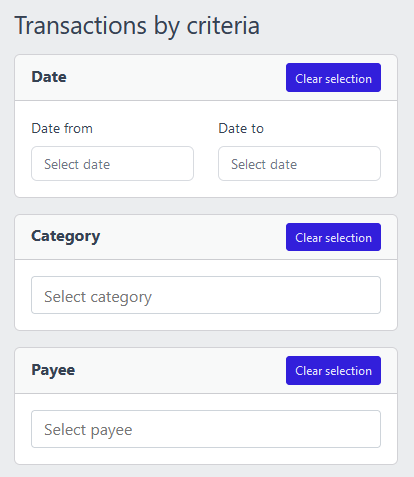
Screenshot of YAFFA personal finance application showing transaction search and filter options
Find and Review

Search, filter, and review all your activity in one place

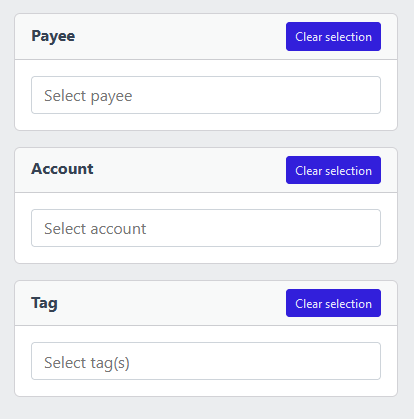
Every transaction you record — past, upcoming, or planned — is searchable and filterable. Narrow down by account, payee, category, tag, date range, or amount to find exactly what you are looking for. The same view covers one-time entries and recurring scheduled events.

One concept, built for real financial life

A transaction in YAFFA is not just a row in a spreadsheet. It is the primary record of a financial event — or a financial expectation. Every purchase, every paycheck, every transfer between your accounts, and every investment trade flows through this one concept, giving you a single coherent history of your financial life.

Rather than forcing you to learn separate tools for spending, transfers, and investments, YAFFA uses a unified transaction model that adapts to whatever you need to record.
Withdrawal

Money leaving one of your accounts and going to a payee. The everyday purchase: groceries, a utility bill, dining out. Can be split across multiple categories to reflect exactly what the spending covered.

Deposit

Money entering one of your accounts from a payee. Your salary, a freelance payment, a refund, or a reimbursement. Like withdrawals, deposits can be split into categorized items so your income reports reflect the real breakdown.

Transfer

Money moving between two of your own accounts — from checking to savings, or paying a credit card. Transfers are internal movements. They do not count as spending or income in your reports, which keeps your cashflow picture accurate.


Investment transactions

YAFFA also handles investment activity as a distinct transaction family — buy, sell, add shares, remove shares, dividend, and interest yield. Each type captures the right combination of quantity, price, commission, and income so your investment records stay accurate alongside your everyday cashflow.

Screenshot of YAFFA personal finance application showing a filtered transaction list
Split Categorization

One payment, broken down into exactly what it covered

A single supermarket receipt might cover food, household supplies, and a pharmacy item. Transaction items let you split any withdrawal or deposit across multiple categories without creating separate entries. YAFFA speeds up this process: it suggests frequently used categories for a payee, can load a proportional split based on past history, and can auto-assign any remaining amount to a payee's default category.

About categories

Scheduled transactions

For events that repeat — rent, salary, loan payments, a monthly investment purchase — YAFFA lets you define a schedule once and reuse it indefinitely. Scheduled transactions appear on the dashboard calendar so you can see what is coming up, and they feed YAFFA's cashflow forecasts so future balances reflect your real commitments.

When a scheduled event falls due, you can enter it as an actual historical transaction with one action — all the details are pre-filled from the schedule template. For events where you want even less involvement, YAFFA supports fully automatic recording.

Budget transactions

Budgets answer a different question: not “what exact event is coming?” but “how much do I expect to spend or receive in this area?” A monthly groceries budget or a household spending target does not have a fixed payee or date — but it still belongs in your financial plan.

Budget transactions feed the plan-versus-actual comparisons in reports, so you can see at the end of each month whether you stayed within your expectations — not just what you actually spent.


Tags for cross-cutting context

Each transaction item can carry one or more tags — lightweight labels for themes that cut across categories, like a renovation project, a business trip, or a batch of expenses awaiting reimbursement. Tags let you pull together all related activity later without changing your underlying category structure.

Explore YAFFA

More features and further details

Check out other features of YAFFA personal finance application, or learn more by reading the detailed documentation.

Features

Learn more about the features of YAFFA personal finance application

Learn More about Features

Documentation

Read detailed guides how to get started with YAFFA personal finance application.

Learn More about Documentation

Quick Entry

YAFFA learns your habits to make recording each transaction faster — suggested payees, pre-filled categories, one-click scheduled entries

Learn More about Quick Entry

Ready to take control of your finances?

Try the YAFFA sandbox free — no credit card, no bank connection, no data sharing.

Try the Demo — No Install Needed